Firewall

Written by: Iron Hulk Published: Jan 19, 2025 Reading time: Iron Hulk
Back to Blogs

بسم الله الرحمن الرحيم


What a Firewall Is and How It Began

A firewall functions as a dedicated guardian positioned between two network zones, usually a trusted internal environment and the open Internet, making per-packet decisions about which traffic is allowed through and which is denied. The concept surfaced in 1988 at Digital Equipment Corporation (DEC), where engineers built the first packet-filter firewall to curb a wave of early-Internet worms. Researchers at AT&T Bell Labs soon advanced the idea into application proxy firewalls that could interpret higher-level protocols. By 1993–1994, Check Point introduced stateful inspection, enabling devices to follow the entire life-cycle of a connection instead of treating each packet in isolation. As rising bandwidth and more sophisticated attacks defined the 2000s, vendors merged multiple functions, IPS, URL filtering, antivirus, and more into a single platform known as a unified threat management (UTM) firewall. Another milestone arrived in 2009, when Palo Alto Networks launched the first widely adopted next-generation firewall (NGFW), adding application awareness, user identity mapping, and cloud-based threat intelligence. Today, “firewall” can describe a hardware appliance, virtual machine, cloud-native service, or lightweight host agent, but the mission remains the same: enforce security policy at a trust boundary.


What Modern Firewalls Actually Do

💡 In short: It filters the good from the bad, keeping the nasties out and sometimes preventing your infected device from causing trouble elsewhere.

Host-based vs Network-based Firewalls

Host-Based Firewall

Software installed directly on individual endpoints (servers, workstations, mobile devices) that enforces per-host rules based on applications, users, and process behaviour.

Pros

  • Personalised protection tailored to the device.
  • Secures users on untrusted networks (Ex: public Wi-Fi).
  • Controls traffic between local applications.
  • Simpler UI for individuals (Ex: Windows Defender Firewall).

Cons

  • Protects only the local device.
  • Consumes host CPU / memory.
  • Requires per-device management.
  • Examples: Windows Defender, macOS Firewall, Norton.
Network-Based Firewall

Deployed at network boundaries as dedicated appliances or virtual instances, inspecting traffic for entire subnets and enforcing centralised security policies at multi-gigabit throughput.

Pros

  • One device protects the whole internal network.
  • Offloads processing from endpoints.
  • Centralised management & logging.
  • Feature-rich (deep inspection, IPS, etc.).

Cons

  • No protection when devices roam outside.
  • Doesn’t police intra-LAN traffic.
  • Setup/maintenance requires deeper expertise.
  • Examples: Cisco ASA, Palo Alto, pfSense.
Read more: HP · Paloalto

Core Network-Based Firewall

Packet-Filtering Firewall

Represent the foundational architecture in firewall technology, operating at the network layer (Layer 3) and transport layer (Layer 4) of the OSI model. These systems inspect individual data packets in isolation, applying allow/deny decisions based on predefined rules that evaluate packet headers. Key evaluation criteria include source/destination IP addresses, source/destination port numbers, and communication protocols (TCP, UDP, ICMP).

Pros

  • High Performance and Low Latency: By examining only packet headers rather than payload content, packet-filtering firewalls achieve exceptionally fast processing speeds, often handling multi-gigabit traffic volumes with minimal latency. This efficiency makes them ideal for high-throughput environments like internet service providers or backbone networks..
  • Resource Efficiency: Minimal computational requirements allow deployment on low-cost hardware, including routers with integrated firewall capabilities.
  • Transparent Operation: Unlike proxy-based solutions, packet filters don't require client reconfiguration since they operate transparently at the network layer.
  • Simplified Rule Verification: Administrators can easily test filtering rules due to straightforward allow/deny conditions based on header parameters.
  • Cheap/Easy to Implement: Often built into basic network hardware.

Cons

  • Limited Context Awareness: Inability to track connection states leaves these firewalls vulnerable to IP spoofing attacks and advanced evasion techniques where malicious packets mimic legitimate header information.
  • No Application-Layer Inspection: Lack of payload analysis prevents detection of application-layer threats like SQL injection or malware embedded within allowed protocols.
  • Static Rule Limitations: Rule sets become cumbersome in complex environments, often leading to configuration errors or unintended access loopholes.
  • Inadequate for Modern Threats: Cannot defend against sophisticated attacks leveraging allowed ports/protocols for command-and-control communications or data exfiltration.
💡 Ideal for network segments requiring basic access control without deep inspection, such as internal network segmentation between departments or as a first-line filter before more advanced firewalls.

Circuit-Level Gateway

Circuit-level gateways (CLGs) sit at the Session layer (L5), validating the handshake that opens a connection rather than peeking inside every packet. They create a trusted virtual circuit between internal clients and outside servers—once the session is approved, traffic flows at wire speed.

Pros

  • Session validation: Blocks unauthorized handshakes—thwarts scans and hijacks.
  • Network obfuscation: Masks internal IPs and topology from outsiders.
  • High throughput: Minimal processing after approval keeps latency tiny.
  • Protocol agnosticism: Works with any TCP/UDP traffic without protocol-specific proxies.

Cons

  • No content inspection: Payload-borne malware remains invisible.
  • Limited attack protection: Cannot stop abuses within an established session.
  • No user authentication: Relies solely on IP/port checks.
  • Complex protocols: May falter with dynamic port assignments (Ex: FTP passive).
💡 Effective as a lightweight supplement to other firewalls in environments requiring fast session validation such as high-traffic web server farms or as a component in VPN gateways.

Stateful Inspection Firewall

Stateful inspection firewalls enhance traditional packet filters by maintaining live context about each network connection. Operating mainly at the transport layer (Layer 4), they watch handshakes, sequence numbers and session duration—so they can spot spoofed or out-of-order packets and distinguish legitimate replies from unsolicited probes.

Pros

  • Contextual Decision-Making: By understanding connection states, these firewalls prevent IP spoofing and certain denial-of-service attacks that exploit stateless architectures.
  • Protocol Compliance Enforcement: Can enforce proper protocol behavior (Ex: ensuring TCP handshake completion) to block malformed packet attacks.
  • Dynamic Rule Application: Handles dynamic ports (ex: passive FTP) automatically.
  • Enhanced Logging: Detailed session records provide richer forensic data compared to packet filters4.

Cons

  • Resource Intensive: Connection state tables consume significant memory and processing resources, potentially limiting scalability in high-connection environments.
  • Application-Layer Blindness: Like packet filters, they cannot inspect payload content for application-layer threats unless integrated with deeper inspection capabilities.
  • Vulnerability to Flooding Attacks: State table exhaustion attacks can crash the firewall by overwhelming it with fake connection requests.
  • Complex Configuration: Rule sets must account for state dependencies, increasing administrative overhead.
💡 Well-suited for enterprise network perimeters where balancing security and performance is critical, particularly for environments with predictable traffic patterns.

Next-Generation Firewall (NGFW)

Next-generation firewalls integrate traditional stateful inspection with advanced security services, including deep packet inspection (DPI), intrusion prevention, application awareness, and cloud-fed threat intelligence. Operating across Layers 2 - 7, NGFWs identify applications regardless of port or protocol and enforce granular, user-aware policies.

Pros

  • Application Visibility and Control: Identifies thousands of applications (including encrypted traffic) to enforce granular policies (Ex: "block Dropbox but allow OneDrive").
  • Integrated Threat Prevention: Combines firewall, IPS, antivirus, and sandboxing to block known exploits, malware, and zero-day threats.
  • User-Centric Policies: Enables rules based on user identity (via LDAP/AD integration) rather than just IP addresses.
  • SSL/TLS Inspection: Decrypts and inspects encrypted traffic for hidden threats.

Cons

  • High Cost: Subscription fees for threat intelligence and advanced features significantly increase total cost of ownership.
  • Performance Impact: Resource-intensive features like SSL inspection and DPI can introduce latency, especially on lower-end models.
  • Management Complexity: Unified security requires sophisticated configuration and ongoing tuning to balance security and usability.
  • Potential Overblocking: Overly aggressive application control or IPS rules may disrupt legitimate business applications.
💡 Essential for modern networks requiring comprehensive protection against advanced threats particularly in environments with diverse applications, encrypted traffic, or regulatory compliance requirements.

Proxy Firewall

A proxy (Layer 7) firewall terminates the client’s session, inspects the full protocol dialogue, then opens a new session to the destination on the client’s behalf. Because each side talks only to the proxy, the original endpoints never see one another.

Client → [Proxy Firewall] → Internet Server  (Inspects HTTP/FTP/SMTP content)
  1. Step 1: Client sends request to the proxy (Ex: http://proxy:8080).
  2. Step 2: Proxy validates protocol compliance and inspects payload (Ex: checks for SQLi in HTTP POST).
  3. Step 3: If safe, proxy rebuilds the request from itself to the server.

Pros

  • Ultra-Deep Inspection: Reads actual content (Ex: blocks malware in email attachments).
  • Protocol Sanitization: Fixes RFC violations or drops malformed packets.
  • Anonymity: Hides internal IPs; external servers only see the proxy.

Cons

  • Scalability Issues: Struggles with high traffic volumes (Ex: 10Gbps+ networks).
  • Client Configuration: Often needs manual proxy settings on endpoints.

Firewall Manager

A firewall manager is a centralised policy-orchestration and operations hub that unifies configuration, monitoring, and compliance across dozens or hundreds of firewall instances.

Policy Orchestration: Push consistent rules to 20 + firewalls with one click.
Device Monitoring: Live health checks, traffic analytics, threat dashboards.
Version Control: Track policy changes, who changed what, and when.
Automation: Script mass updates Ex: block a malicious IP globally.
Compliance Reporting: Generate PCI, HIPAA, and ISO audit trails.
Firmware Management: Synchronize security updates across all devices.
Log View: Aggregate traffic logs in one centralized console.
User Management: Assign role-based access securely across firewalls.
Scalability: Centrally manage 500 + firewalls across hybrid environments.
💡 Without a manager, large estates drift into inconsistent rules, mismatched firmware versions, and blind spots in compliance evidence.

Default-Deny vs Default-Allow Policies

Policy Type Approach Advantages Disadvantages Best For
Default-Deny Blocks all traffic except explicitly allowed Most secure; minimizes attack surface Higher admin overhead; may break legitimate apps High-security environments, regulated industries
Default-Allow Permits all traffic except explicitly blocked Easier to implement; fewer user complaints Security risks from overlooked threats Internal test networks, legacy environments

Firewall Types Quick-Reference

Packet Filter

  • OSI Layer: L3-L4
  • Inspection: Headers only
  • Best For: Basic segmentation, ISPs
  • Products: Router ACLs, iptables

Stateful

  • OSI Layer: L4
  • Inspection: Conn. state
  • Best For: Enterprise perimeters
  • Products: Cisco ASA, Juniper SRX

Proxy

  • OSI Layer: L7
  • Inspection: Full content
  • Best For: Web / app protection
  • Products: Blue Coat, Squid

NGFW

  • OSI Layer: L2-L7
  • Inspection: Apps / users / content
  • Best For: Modern enterprises
  • Products: Palo Alto, FortiGate

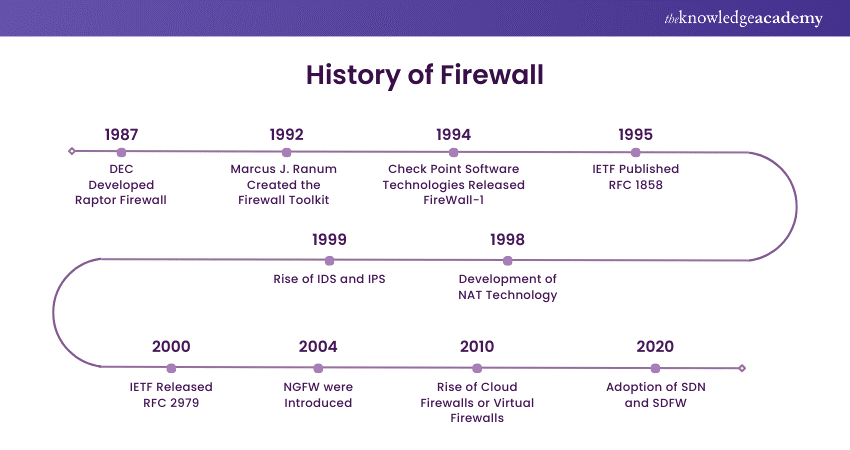
Evolution of Firewall Technology

Timeline of firewall history
Key milestones from packet-filter origins (1988) to next-generation, AI-assisted defenses today.

Security Best-Practice Guide

  • Place the MGMT interface on an out-of-band VLAN or loopback; no Internet-routable IP.
  • Whitelist source IPs for SSH/HTTPS/SNMP.
  • Enforce multi-factor auth and unique named accounts; disable default passwords and legacy protocols (Telnet, HTTP, SSH-v1, TLS < 1.2).
  • Disable USB management ports and shut down other unused ports.
  • Why it matters: Cuts config drift and catches risky "Friday-night" changes before they propagate.
  • Add an explicit “deny all” rule at the end of every rulebase.
  • Create allow rules only for documented flows; tag each with owner, ticket ID, expiration.
  • Sort rules by specificity—fixed IP/port first, wildcards last.
  • Why it matters: Eliminates shadow ports and logs surprise traffic for analysis.
  • Use RBAC roles such as Read-Only, Log-Analyst, Policy Author.
  • Grant configure rights only after change-control approval.
  • Rotate passwords every 90 days and enforce MFA.
  • Why it matters: Prevents unauthorized rule changes and limits insider risk.
  • Prefer IKEv2, AES-GCM, DH group 19+.
  • Disable aggressive mode and weak hashes.
  • Pin peer certificates; rotate PSKs quarterly.
  • Apply split-tunnelling only for allowed subnets.
  • Why it matters: Blocks downgrade and MITM attacks; isolates remote users.
  • Track vendor advisories; schedule upgrades quarterly or immediately for critical CVEs.
  • Back up running config on every change commit; encrypt backups with the organisation’s key vault.
  • Replicate configs to a lab appliance; run automated regression tests before production push.
  • Why it matters: Ensures vulnerabilities are closed fast without unexpected outage; rollback is one file away.
  • Integrate firewall manager (Panorama, FortiManager, Smart-1, etc.) with ITSM so every change references a ticket.
  • Schedule nightly policy-drift reports that diff running vs golden config.
  • Enforce four-eyes approval on any rule wider than /24 or port 0-65535.
  • Why it matters: Cuts config drift and catches risky "Friday-night" changes before they propagate.
  • Deploy firewalls in active-active or active-standby pairs with full state-table sync.
  • Dual power feeds, dual WAN/LAN links via separate switch stacks, plus dynamic routing or VRRP/HSRP.
  • Heartbeat links + dataplane probes trigger failover only when both control and data paths degrade.
  • Why it matters: Removes the firewall as a single point of failure and maintains session continuity during faults or upgrades.
  • Enable critical alerts: port scans, admin login failures, VPN brute-force attempts, etc.
  • Forward logs to Splunk, QRadar, or other SIEM for correlation.
  • Capture session start/stop and NAT before/after translations.
  • Why it matters: Rich telemetry accelerates incident response and compliance readiness.