Callback Abuse

Written by: Iron Hulk Published: Jan 20, 2025 Reading time: Iron Hulk
Back to Blogs

بسم الله الرحمن الرحيم


Callback Abuse: is the technique of handing a pointer to your own code, the “callback”, into a legitimate system or library function so that, when a normal event or condition occurs, that function unwittingly “calls back” into your malicious logic. By doing so you piggy-back on trusted infrastructure, timers, GUI loops, I/O completions, exception handlers, so your code runs under the guise of normal behavior. This avoids creating new threads or processes and dramatically reduces the noise defenders see, making your payload far stealthier.

This inversion of control is what makes callbacks so powerful:

  • Event-driven flow: Your code runs only when it matters (Ex: a timer fires, a window receives a message, an I/O completes).
  • Thread reuse: Because the operating system or library already owns a pool of threads, you rarely need to create one yourself.
  • Stealth: Since no explicit CreateThread call appears in your code, detection logic that keys off thread creation often misses the execution entirely.

Callback Abuse Cheat-Sheet

CreateTimerQueueTimer

Definition: Is a Windows API that lets you schedule a function (your “callback”) to run once after a delay you choose or to repeat at a regular interval.

When it fires: After a delay you set, then repeatedly on a built-in thread-pool timer

Where it runs: A background worker thread inside the same process

Why attackers use it: Easy “sleep-then-wake” for payloads without creating a new thread

Attack process:

  1. Allocate RWX or RX memory and copy your shellcode or stub there
  2. Call CreateTimerQueueTimer(&hTimer, NULL, MyCallbackFunction, myContextPointer, dueTime, period, 0).
  3. myContextPointer is optional data you pass in.

What defenders can spot: ETW ThreadPoolTimer events or periodic CPU bursts.


CreateTimerQueueTimer by itself is a perfectly legitimate Windows API and won’t trip AV or EDR just because you called it. What gets flagged is how you use it:

  1. Callback in non-image memory: If the function pointer you registered lives in heap/RWX memory rather than inside a signed DLL or EXE image, EDRs will log “callback into executable heap.”
  2. Heap/RWX allocations beforehand: VirtualAlloc’ing a large RWX region, writing shellcode there, then immediately scheduling it via CreateTimerQueueTimer looks very suspicious.
  3. Unusual timer patterns: Rapid, high-frequency timers or timers set far in the future and never reset can trigger heuristic rules.
  4. ETW/Telemetry anomalies: Defenders monitor the ThreadPoolTimer ETW provider; if callback addresses jump around or point into non-standard regions, that’s a red flag.
EnumWindows/EnumChildWindows

Definition: Is a Windows API function that lets a program discover all top-level desktop windows or child windows currently open on the system.

When it fires: Each time Windows loops through open windows (Ex: a GUI refresh).

Where it runs: The application’s main GUI thread during that loop.

Why attackers use it: Blends into real GUI activity; defenders see “EnumWindows” on the call stack, which is common in UI tools.

Attack process:

  1. Inject a DLL into the target process, Ex: via CreateRemoteThread + LoadLibrary.
  2. In that DLL, call EnumWindows (MyEnumProc, param) where MyEnumProc points into your code.
  3. Inside MyEnumProc, locate a writable region or perform your malicious action.

What defenders can spot: Unusual call stacks in user32!EnumWindows carrying RX pages.


EDR and AV products generally don’t block or flag a plain EnumWindows call, by itself it’s a perfectly normal GUI API. What they look for are anomalies around how you use it:

  1. Callback address in non-standard memory: If your WNDENUMPROC pointer lives in RWX or heap memory instead of a legit module, EDRs will surface that as a “callback into non-image region.”
  2. Tight, repeated loops: Calling EnumWindows hundreds or thousands of times per second or in rapid succession across many processes can trip heuristic rate-based rules.
  3. DLL injection and reflective loading: Most malicious uses of EnumWindows follow a DLL-inject → LoadLibrary or reflective loader chain. The injection and memory protections (noperms, RWX) are higher-confidence signals than the enumeration itself.
  4. Suspicious call-stack sequences: EDRs can detect user32!EnumWindows → your callback → VirtualProtect+CreateThread” patterns. Correlating GUI enumeration with memory-allocation APIs spikes the alert priority.
  5. Combined behaviors: EnumWindows used alongside process enumeration (CreateToolhelp32Snapshot), module dumping (DbgHelp), or registry reads in the same timeframe often forms a kill chain that gets flagged.

Bottom line: a single, infrequent EnumWindows in a signed DLL isn’t enough to trip modern EDR. However, if your callback lives in RX heap, fires in a tight loop (you’ll see rapidly changing hWnd values each invocation), or immediately unrolls into reflective loading, detection engines will key on that behavioral context, not the API name alone.
QueueUserAPC/NtQueueApcThread

Definition: Queues an “asynchronous procedure call” to run in a target thread when it next enters an alertable wait state.

When it fires: As soon as a chosen thread enters an alertable wait SleepEx.

Where it runs: Inside that already-running thread—no new threads needed

Why attackers use it: Blends into existing threads and dodges thread-creation alerts

Attack process:

  1. Open a handle to a thread in the target process with THREAD_SET_CONTEXT.
  2. Allocate memory for your shellcode and copy it into the target.
  3. Call QueueUserAPC(MyApcFunc, hThread, param).
  4. Force or wait for an alertable wait in that thread, and when that thread calls SleepEx(..., TRUE) or WaitForSingleObjectEx(..., TRUE), the OS suspends its wait and invokes MyApcFunc(myParameter);

What defenders can spot: APC injections logged by EDR or a big jump in queued APCs.


Calling QueueUserAPC or the underlying syscall NtQueueApcThread, isn’t malicious and won’t trip AV/EDR signatures—but defenders do watch for the broader “APC injection” pattern. They flag when:

  1. Your APC address lives in non-image memory: Pointing the callback into a freshly-allocated RWX heap or the writeable section of a reflective DLL looks suspicious.
  2. You open a remote thread handle & queue APCs: Repeated calls to OpenThread + QueueUserAPC into another process mean thread-hijacking.
  3. The target thread never enters a legit alertable wait: Continuously poking APCs without real SleepEx/WaitFor…Ex usage rings alarms.
  4. Suspicious call-stack sequences: VirtualAlloc + WriteProcessMemory then immediate APC queueing is a high-confidence indicator of shellcode injection.
SetWinEventHook

Definition: Is a Windows API that lets an application subscribe to system-level or process-level UI events, things like window creation, focus changes, minimize/restore, or object events (menu open, scrollbar move). You provide a function pointer WINEVENTPROC and flags defining which events you want. Whenever one of those events occurs, Windows “calls back” into your function.

When it fires: On focus changes, minimize/restore, or other user-interface events.

Where it runs: Callback on almost any GUI activity while the hook is set.

Why attackers use it: Provides long-lived, low-CPU persistence tied to user actions.

Attack process:

  1. Call SetWinEventHook(EVENT_SYSTEM_FOREGROUND, EVENT_SYSTEM_MINIMIZEEND, NULL, MyWinEventProc, 0, 0, WINEVENT_OUTOFCONTEXT).
  2. In MyWinEventProc, perform your payload action or inject further code.

What defenders can spot: Extra window-event hooks and unfamiliar DLLs kept loaded.


Why EDR/AV don’t flag the API itself:

  1. Legitimate, built-in use: Accessibility tools, screen readers, UI-automation frameworks, and testing suites rely on SetWinEventHook to know when UI state changes. It’s a core part of the Windows accessibility and automation model.
  2. No overt injection: Simply registering a hook doesn’t require injecting code into other processes or creating remote threads, everything operates in your own process’s context unless you deliberately request out-of-context hooks.
  3. High false-positive risk: Blocking or alerting on every SetWinEventHook call would break countless legitimate applications, so EDR/AV focus on how it’s used hook flags, callback address regions, accompanying suspicious behaviors, rather than on the function name alone.
Bottom line: This console application installs a WinEvent hook to catch when the foreground window changes, runs a lightweight message loop so the hook can fire, pops up a MessageBox once on the first focus shift, then automatically unhooks and exits.
RegisterWaitForSingleObject

Definition: This API lets you tell Windows “watch this handle (event, mutex, process, timer) and when it’s signaled or after a timeout call my function on a thread-pool thread.” It’s a convenient way to schedule work without blocking your main thread or spinning in a loop.

When it fires: When a handle you watch (event, mutex, process, etc.) is signaled or times out

Where it runs: A thread-pool worker thread.

Why attackers use it: Lets payload trigger only after a specific condition (Ex: service starts).

Attack process:

  1. Create or open a synchronization object (Ex: named event).
  2. Call RegisterWaitForSingleObject(&waitHandle, hObject, MyCallback, param, INFINITE, WT_EXECUTEDEFAULT).
  3. In MyCallback, move to next stage or drop a payload.

What defenders can spot: New wait objects listed by NtQueryObject or ETW ThreadPoolWait events.


EDR/AV will flag it if:

  1. Callback pointer in non-image memory: Registering a wait whose callback lives in RWX heap or a reflective DLL triggers “callback into non-image region” alerts.
  2. Suspicious memory patterns: Allocating a big RWX region immediately before calling RegisterWaitForSingleObject—the combo looks like shellcode staging.
  3. High-volume or out-of-context waits: Spawning hundreds of wait registrations on handles you created (instead of reusing a single wait or timer) can hit rate-based heuristics.
  4. ETW telemetry: The Microsoft-Windows-ThreadPool/Operational provider logs ThreadPoolWait events; unusual callback addresses or too many concurrent waits stand out.
RtlInstallFunctionTableCallback

Definition: lets code register its own unwind-information provider for a given memory range so the OS can correctly walk your stack and handle exceptions in that range.

When it fires: First time the system tries to unwind an exception in a chosen memory range.

Where it runs: In the thread that just crashed or triggered an exception.

Why attackers use it: Turns a “controlled crash” into execution without direct API calls.

Attack process:

  1. Allocate a memory region marked RX and copy your payload there.
  2. Call RtlInstallFunctionTableCallback(address, size, MyUnwindCallback, Context).
  3. Deliberately cause an exception in that range—OS calls your unwind callback, which jumps into payload.

What defenders can spot: Dynamic function tables pointing to writable/executable memory.

CreateThreadpoolIo

Definition: lets an application offload asynchronous I/O operations (files, sockets, pipes) to a managed thread-pool.

When it fires: After an asynchronous file, socket, or pipe I/O completes

Where it runs: A thread-pool I/O worker.

Why attackers use it: Hides payload inside normal async I/O flow (Ex: network traffic).

Attack process:

  1. Call CreateThreadpoolIo(hFile, MyIoCallback, Context, NULL).
  2. Start an overlapped read/write on that handle.
  3. When data arrives or write completes, MyIoCallback will executes your code.

What defenders can spot: I/O callbacks to non-image memory and mismatched I/O patterns.


Closing Thoughts

  • Delays launch to dodge “first-few-seconds” sandbox rules.
  • Keeps opcode patterns hidden until runtime.
  • Avoids thread-creation events most EDRs prioritise.

Proof of Concept

Describe image

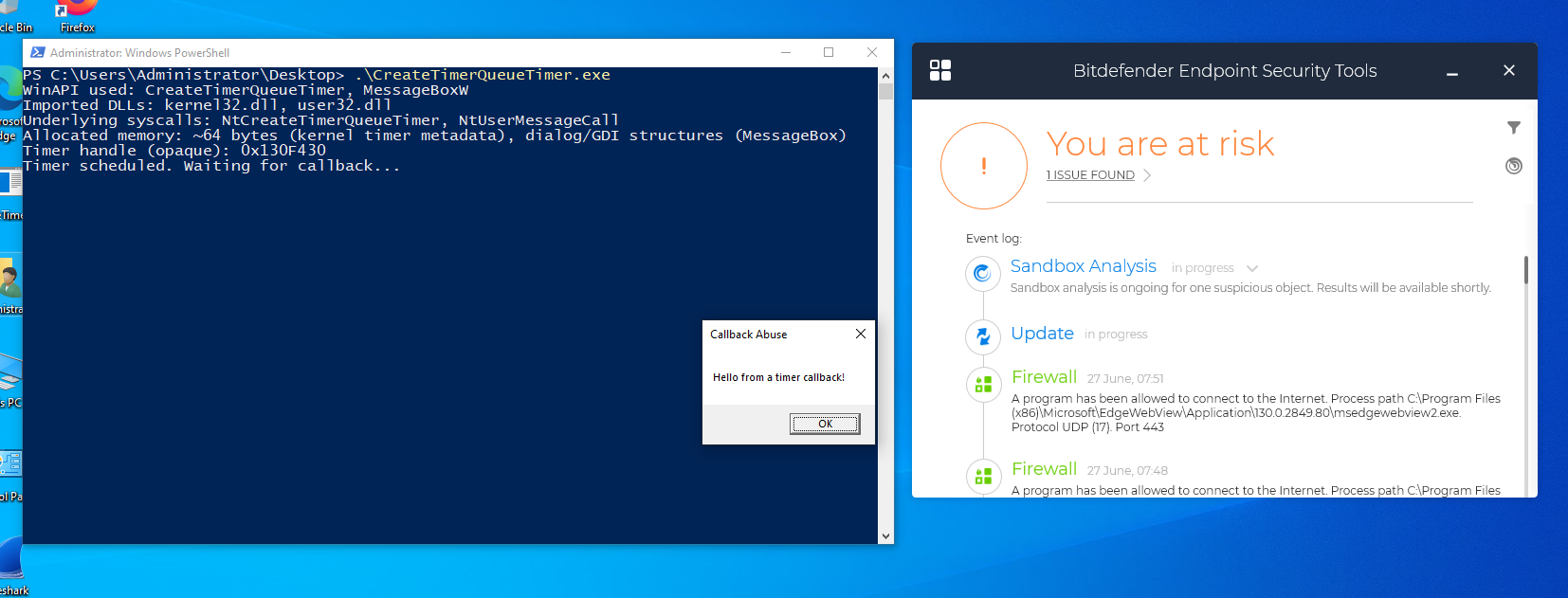
In the above proof-of-concept, we leveraged the CreateTimerQueueTimer callback to display a MessageBox. As mentioned, the timer itself doesn’t trip AV/EDR, but anything it triggers afterward is closely watched. This is just our first milestone, there’s still a long, challenging road ahead before we can outmaneuver every security layer.

My C# Project

CreateTimerQueueTimer Abuse
              
// Project Name: CreateTimerQueueTimer Abuse
// By: Iron Hulk

using System;
using System.Runtime.InteropServices;
using System.Threading;

class Program
{
    // Delegate matching WAITORTIMERCALLBACK
    private delegate void TimerCallback(IntPtr lpParameter, bool timerFired);

    [DllImport("kernel32.dll", SetLastError = true)]
    private static extern bool CreateTimerQueueTimer(
        out IntPtr phNewTimer,
        IntPtr timerQueue,
        TimerCallback callback,
        IntPtr parameter,
        uint dueTime,
        uint period,
        uint flags
    );

    [DllImport("user32.dll", CharSet = CharSet.Auto)]
    private static extern int MessageBox(IntPtr hWnd, string text, string caption, uint type);

    static void Main()
    {
        // Schedule a one-shot timer 2 seconds from now
        if (!CreateTimerQueueTimer(
            out IntPtr timerHandle,
            IntPtr.Zero,
            TimerFired,
            IntPtr.Zero,
            2000,   // dueTime = 2000ms
            0,      // period = 0 (one-shot)
            0
        ))
        {
            Console.WriteLine("CreateTimerQueueTimer failed: " + Marshal.GetLastWin32Error());
            return;
        }

        // Debug output
        Console.WriteLine("Timer scheduled. Waiting for callback...");
        Thread.Sleep(Timeout.Infinite);

    }

    // This method runs on a thread-pool thread when the timer fires
    private static void TimerFired(IntPtr lpParameter, bool timerFired)
    {
        MessageBox(IntPtr.Zero, "Hello from a timer callback!", "Callback Abuse", 0);
        Environment.Exit(0);
    }
}
              
            
EnumWindows/EnumChildWindows Abuse
              
// Project Name: EnumWindows/EnumChildWindows Abuse
// By: Iron Hulk

using System;
using System.Runtime.InteropServices;
using System.Text;
class Program
{
    // Flag to ensure only one callback fires for child windows
    private static bool _childShown;

    // Delegate for the window‐enumeration callbacks
    private delegate bool WndEnumProc(IntPtr hWnd, IntPtr lParam);

    [DllImport("user32.dll", SetLastError = true)]
    private static extern bool EnumWindows(WndEnumProc lpEnumFunc, IntPtr lParam);

    [DllImport("user32.dll", SetLastError = true)]
    private static extern bool EnumChildWindows(IntPtr hWndParent, WndEnumProc lpEnumFunc, IntPtr lParam);

    [DllImport("user32.dll")]
    private static extern IntPtr GetDesktopWindow();

    [DllImport("user32.dll", CharSet = CharSet.Auto)]
    private static extern int MessageBox(IntPtr hWnd, string text, string caption, uint type);

    static void Main()
    {
        Console.WriteLine("Calling EnumWindows…");
        EnumWindows(EnumWindowsCallback, IntPtr.Zero);

        Console.WriteLine("Calling EnumChildWindows on desktop…");
        EnumChildWindows(GetDesktopWindow(), EnumChildWindowsCallback, IntPtr.Zero);

        Console.WriteLine("Done. Press any key to exit.");
        Console.ReadKey();
    }

    private static bool EnumWindowsCallback(IntPtr hWnd, IntPtr lParam)
    {
        // Show a MessageBox once, then stop enumeration
        MessageBox(IntPtr.Zero,
            $"EnumWindows callback fired for hWnd=0x{hWnd:X}",
            "EnumWindows Abuse", 0);
        return false;  // halt after first callback
    }

    // This will stop for all EnumChildWindowsCallback
    /*
    private static bool EnumChildWindowsCallback(IntPtr hWnd, IntPtr lParam)
    {
        // Show a MessageBox for each child (you can return true to continue)
        MessageBox(IntPtr.Zero, $"EnumChildWindows callback for child hWnd=0x{hWnd:X}",
                  "EnumChildWindows Abuse", 0);
        return true;   // return true to continue through all children
    }
    */
    // This will stop for one EnumChildWindowsCallback
    
    private static bool EnumChildWindowsCallback(IntPtr hWnd, IntPtr lParam)
    {
        if (_childShown)
            return false;  // already shown, stop enumeration

        _childShown = true;
        MessageBox(IntPtr.Zero,
            $"EnumChildWindows callback fired for child hWnd=0x{hWnd:X}",
            "EnumChildWindows Abuse", 0);

        return false;  // stop after first child callback
    }
}
              
            
QueueUserAPC/NtQueueApcThread Abuse
              
// Project Name: QueueUserAPC/NtQueueApcThread Abuse
// By: Iron Hulk

using System;
using System.Runtime.InteropServices;
class Program
{
    // APC callback signature
    private delegate void ApcProc(UIntPtr dwParam);

    [DllImport("kernel32.dll", SetLastError = true)]
    private static extern IntPtr OpenThread(
        uint dwDesiredAccess,
        bool bInheritHandle,
        uint dwThreadId
    );

    [DllImport("kernel32.dll", SetLastError = true)]
    private static extern uint QueueUserAPC(
        ApcProc pfnAPC,
        IntPtr hThread,
        UIntPtr dwData
    );

    [DllImport("kernel32.dll")]
    private static extern uint SleepEx(
        uint dwMilliseconds,
        bool bAlertable
    );

    [DllImport("kernel32.dll")]
    private static extern uint GetCurrentThreadId();

    [DllImport("user32.dll", CharSet = CharSet.Auto)]
    private static extern int MessageBox(
        IntPtr hWnd,
        string text,
        string caption,
        uint type
    );

    static void Main()
    {
        Console.WriteLine("Opening current thread handle...");
        uint tid = GetCurrentThreadId();
        IntPtr hThread = OpenThread(0x0010, false, tid);

        Console.WriteLine("Queueing APC to ourselves...");
        QueueUserAPC(ApcCallback, hThread, UIntPtr.Zero);

        Console.WriteLine("Entering alertable wait (SleepEx 5s)...");
        SleepEx(5000, true);

        Console.WriteLine("Finished. If APC fired, you saw a MessageBox.");
    }

    // Runs when SleepEx is in alertable state
    private static void ApcCallback(UIntPtr dwParam)
    {
        MessageBox(IntPtr.Zero, "Hello from APC callback!", "APC Abuse", 0);
    }
}
              
            
SetWinEventHook Abuse
              
// Project Name: SetWinEventHook Abuse
// By: Iron Hulk

using System;
using System.Runtime.InteropServices;
using System.Threading;

class Program
{
    // Flag to ensure we only fire once
    private static bool _fired;

    // WinEvent hook callback signature
    private delegate void WinEventDelegate(
        IntPtr hWinEventHook,
        uint eventType,
        IntPtr hWnd,
        int idObject,
        int idChild,
        uint dwEventThread,
        uint dwmsEventTime
    );

    // POINT & MSG for message loop
    [StructLayout(LayoutKind.Sequential)]
    private struct POINT { public int X, Y; }

    [StructLayout(LayoutKind.Sequential)]
    private struct MSG
    {
        public IntPtr hwnd;
        public uint message;
        public UIntPtr wParam;
        public IntPtr lParam;
        public uint time;
        public POINT pt;
    }

    private const uint PM_REMOVE = 0x0001;
    private const uint EVENT_SYSTEM_FOREGROUND = 0x0003;
    private const uint WINEVENT_OUTOFCONTEXT = 0;

    [DllImport("user32.dll", SetLastError = true)]
    private static extern IntPtr SetWinEventHook(
        uint eventMin,
        uint eventMax,
        IntPtr hmodWinEventProc,
        WinEventDelegate lpfnWinEventProc,
        uint idProcess,
        uint idThread,
        uint dwFlags
    );

    [DllImport("user32.dll")]
    private static extern bool UnhookWinEvent(IntPtr hWinEventHook);

    [DllImport("user32.dll", CharSet = CharSet.Auto)]
    private static extern int MessageBox(
        IntPtr hWnd,
        string text,
        string caption,
        uint type
    );

    [DllImport("user32.dll")]
    private static extern bool PeekMessage(
        out MSG lpMsg,
        IntPtr hWnd,
        uint wMsgFilterMin,
        uint wMsgFilterMax,
        uint wRemoveMsg
    );

    [DllImport("user32.dll")]
    private static extern bool TranslateMessage([In] ref MSG lpMsg);

    [DllImport("user32.dll")]
    private static extern IntPtr DispatchMessage([In] ref MSG lpMsg);

    static void Main()
    {
        Console.WriteLine("Registering foreground-change hook (EVENT_SYSTEM_FOREGROUND)...");
        WinEventDelegate callback = WinEventProc;
        IntPtr hook = SetWinEventHook(
            EVENT_SYSTEM_FOREGROUND,
            EVENT_SYSTEM_FOREGROUND,
            IntPtr.Zero,
            callback,
            0,
            0,
            WINEVENT_OUTOFCONTEXT
        );

        if (hook == IntPtr.Zero)
        {
            Console.WriteLine("SetWinEventHook failed: " + Marshal.GetLastWin32Error());
            return;
        }

        Console.WriteLine("Hook installed. Switch windows (e.g., Alt+Tab) to trigger once.");
        Console.WriteLine("Press Enter to exit at any time.");

        // Pump messages until our callback fires or user presses Enter
        while (!_fired)
        {
            if (PeekMessage(out MSG msg, IntPtr.Zero, 0, 0, PM_REMOVE))
            {
                TranslateMessage(ref msg);
                DispatchMessage(ref msg);
            }
            if (Console.KeyAvailable && Console.ReadKey(true).Key == ConsoleKey.Enter)
                break;
            Thread.Sleep(10);
        }

        UnhookWinEvent(hook);
        Console.WriteLine("Hook removed; exiting.");
    }

    private static void WinEventProc(
        IntPtr hWinEventHook,
        uint eventType,
        IntPtr hWnd,
        int idObject,
        int idChild,
        uint dwEventThread,
        uint dwmsEventTime
    )
    {
        if (_fired)
            return;

        _fired = true;
        MessageBox(
            IntPtr.Zero,
            $"Foreground changed to hWnd=0x{hWnd.ToInt64():X}",
            "WinEvent Abuse",
            0
        );
    }
}


Assignment: Enhance this proof-of-concept to execute a different payload; the remaining callback techniques are yours to explore, enjoy the experimentation 🫡

Look at:

  • Input Device Callbacks: Monitor and respond to keyboard, mouse, and other input device events
  • Registry Callbacks: Monitor registry changes in real-time
  • Shell and File System: Interact with Windows Shell, file operations, and system dialogs
  • Power Management: Respond to power state changes, battery status, and system power events
  • File System Monitoring: Real-time monitoring of file and directory changes
  • Expand functionality (logging, alert triggers, background service).